Friday, June 4, 2021

Fwd: Top 10 Leadership Books For 2021


---------- Forwarded message ---------
From: Jacob Morgan <jacob-morgan@b.kajabimail.net>
Date: Fri, Jun 4, 2021 at 11:14 AM
Subject: Top 10 Leadership Books For 2021
To: <stevescott@techacq.com>


Want to grow as a leader? Start reading. ‌ ‌ ‌ ‌ ‌ ‌ ‌ ‌ ‌ ‌ ‌ ‌ ‌ ‌ ‌ ‌ ‌ ‌ ‌ ‌ ‌ ‌ ‌ ‌ ‌ ‌ ‌ ‌ ‌ ‌ ‌ ‌ ‌ ‌ ‌ ‌ ‌ ‌ ‌ ‌ ‌ ‌ ‌ ‌ ‌ ‌ ‌ ‌ ‌ ‌ ‌ ‌ ‌ ‌ ‌ ‌ ‌ ‌ ‌ ‌ ‌ ‌ ‌ ‌ ‌ ‌ ‌ ‌ ‌ ‌ ‌ ‌ ‌ ‌ ‌ ‌ ‌ ‌ ‌ ‌ ‌ ‌ ‌ ‌ ‌ ‌ ‌ ‌ ‌ ‌ ‌ ‌ ‌ ‌ ‌ ‌ ‌ ‌ ‌ ‌ ‌ ‌ ‌ ‌ ‌ ‌ ‌ ‌ ‌ ‌ ‌ ‌ ‌ ‌ ‌ ‌ ‌ ‌ ‌ ‌ ‌ ‌ ‌ ‌ ‌ ‌ ‌ ‌ ‌ ‌ ‌ ‌ ‌ ‌ ‌ ‌ ‌ ‌ ‌ ‌ ‌ ‌ ‌ ‌ ‌ ‌ ‌ ‌ ‌ ‌ ‌ ‌ ‌ ‌ ‌ ‌ ‌ ‌ ‌ ‌ ‌ ‌ ‌ ‌ ‌ ‌ ‌ ‌ ‌ ‌ ‌ ‌ ‌ ‌ ‌ ‌ ‌ ‌ ‌ ‌ ‌ ‌ ‌ ‌ ‌ ‌ ‌ ‌ ‌ ‌ ‌ ‌ ‌ ‌ ‌ ‌ ‌ ‌ ‌ ‌ ‌ ‌ ‌ ‌ ‌ ‌ ‌ ‌ ‌ ‌ ‌ ‌ ‌ ‌ ‌ ‌ ‌ ‌ ‌ ‌ ‌ ‌ ‌ ‌ ‌ ‌ ‌ ‌ ‌ ‌ ‌ ‌ ‌ ‌ ‌ ‌ ‌ ‌ ‌ ‌ ‌ ‌ ‌ ‌ ‌ ‌ ‌ ‌ ‌ ‌ ‌ ‌ ‌ ‌ ‌ ‌ ‌ ‌ ‌ ‌ ‌ ‌ ‌ ‌ ‌ ‌ ‌ ‌ ‌ ‌ ‌ ‌ ‌ ‌ ‌ ‌ ‌ ‌ ‌ ‌ ‌ ‌ ‌ ‌ ‌ ‌ ‌ ‌ ‌ ‌ ‌ ‌ ‌ ‌ ‌ ‌ ‌ ‌ ‌ ‌ ‌ ‌ ‌ ‌ ‌ ‌ ‌ ‌ ‌ ‌ ‌ ‌
View in Web Browser

Hi Steve,

Do you want to grow as a leader in 2021? Start reading. 


There are countless leadership books available today, each with its own advice and case studies. Reading leadership books is one of the best ways to be a super-perpetual learner and to keep expanding your skill set with new ideas and perspectives. 


But where do you start in the sea of leadership books? I've narrowed it down to the top 10 leadership books for 2021. These books all address issues and provide insights that are invaluable in 2021 to becoming a great leader and a great human. 


Trillion Dollar Coach by Eric Schmidt, Jonathan Rosenberg, and Alan Eagle 

This New York Times bestseller reveals the playbook of BIll Campbell, a legendary executive and business coach who helped entrepreneurs create more than a trillion dollars in market value. From interviews with more than 80 people who knew Bill, you'll get an inside look at what makes a great leader and how to drive forward-thinking teams. Trillion Dollar Coach shares the skills and mindsets that are vital to future leaders and is an essential guide for all leaders and entrepreneurs.


Winning Now, Winning Later by David Cote

Leaders and entrepreneurs often wonder where they should prioritize their time and investments--in short-term successes or long-term gains? In Winning Now, Winning Later, David Cote shares how it's possible to focus on both the now and later and see great success. When David took over as CEO of Honeywell, the company was on the brink of bankruptcy because of years of short-term thinking. He turned the company around and led it to both short-term and long-term success. This book shares his 10 essential principles for winning today and tomorrow. I had the chance to interview David on my podcast, and his insights are profound.


Unapologetically Ambitious by Shellye Archambeau   

Shellye Archambeau overcame countless challenges to become one of the first Black female CEOs in Silicon Valley. Ambition alone isn't enough to bring success, and Shellye shares practical tips for leaders to break barriers and create success on their own terms. (She also shared tips as a guest on my podcast). Shellye combines personal stories with real takeaways for leaders to meet their personal and professional goals, no matter where they are in their lives or careers. 


Man's Search For Meaning by Viktor Frankl

This classic book is still as poignant today as it was when it was written in 1946. The book chronicles Viktor Frankl's experience as a prisoner in a Nazi concentration camp. Even when faced with unimaginable hardships, Viktor survived by finding a purpose to feel positive about and then immersively imagining the outcome. Our hardships today aren't as difficult as Viktor's, but leaders need to be mentally strong to overcome their modern challenges. This eye-opening book is a must-read for everyone. 


Think Again by Adam Grant

In our world of constant noise and opinions, one of the greatest skills a leader can have is the ability to rethink and unlearn and be comfortable listening to new ideas and having doubts. Adam Grant is an organizational psychologist who teaches how to embrace being wrong and create organizations of lifelong learners. Think Again tells captivating stories about the power of knowing what you don't know and how it can lead to more knowledge and unique points of view. 


Professional Troublemaker by Luvvie Ajayi Jones

We're all afraid of something--failure, rejection, being too much, the list goes on. But to live a meaningful life that makes a difference, we have to become professional troublemakers and push past that fear to live free. Luvvie Ajayi Jones teaches valuable lessons about moving through fear and how to use your voice for the greater good. You don't have to be fearless to succeed, but you need to acknowledge fear and keep moving forward. This book is honest, thought-provoking, and hilarious. Make sure to also check out my interview with Luvvie here


The Road To Character by David Brooks

Successful leaders don't just drive wealth and revenue, they also have strong character and people skills. The challenge is balancing what David Brooks calls resume virtues with eulogy virtues to build a strong inner character. This book combines psychology, politics, and spirituality to force us to rethink our priorities and strive to build rich inner lives. 


You're Doing Great by Tom Papa

After the difficulties of 2020, you likely feel beaten down and defeated. But as Tom Papa shares in his book, you're doing great! This book is a strong reminder to push aside the stress and overwhelm we all feel to instead focus on the positives around us. It's a chance to recalibrate, remember that we are doing great, and find ways to share that with the people around us. 


The Customer Of The Future by Blake Morgan

Future leaders must have a strong understanding of customers, their needs, and how to best serve them. When a leader has a customer-centric mindset, it spreads throughout the entire organization. My wife, Blake Morgan, is a leading expert on customer experience and shares 10 guiding principles to connect with future customers and lead forward-focused businesses. No matter your industry, this book is a must read for all leaders


The Future Leader by Jacob Morgan

Of course, I had to include my book on the list. There are many books on leadership, but none on how to become a future-ready leader--until I wrote one. For this book, I interviewed more than 140 top CEOs around the world about what it will take to succeed as a leader over the next decade and beyond. From their insights and a survey of more than 14,000 global employees, I created the four mindsets and five skills all leaders need to develop now to lead the future of work. 


______________________________

Do you want life-changing leadership hacks, tips, and strategies from the world's top CEOs?

That's exactly what you get in my new Leadership Reset program!

When I wrote, The Future Leader, I asked over 140 CEOs for their best leadership tip, sadly, I couldn't fit this stuff in the book. That's why I created this new special program for you.

If you sign up you will get access to 31 videos (dripped out over 31 days) which are all around 5 mins in length.

In each video I will share a leadership hack, tip, technique, or strategy from one of the world's top CEOs (Airbnb, Mastercard, Yum! Brands, Siemens, Intercontinental Hotels Group, etc.) that they shared with me.

You will learn things like: 

...How does the CEO of Intercontinental Hotels Group do to stay grounded and connected to what is happening inside of his company?

...What does the co-founder of Airbnb do in all of his meetings to create a culture of transparency and honesty?

...How does David Novak, the former CEO of Yum! Brands, one of the world's largest employers, plan all his days for success?

...What visualization technique does the CEO of clothing retailer LL Bean use to make important decisions?

...How the CEO of Mastercard balances listening to his team members with being able to take decisive action.

AND much more.

You won't find this stuff anywhere else and we made it affordable for everyone at $67.

You can learn more and sign up for The Leadership Reset Here.

Thursday, June 3, 2021

Fwd: Excel Newsletter - Icons you SHOULD have in your Quick Access Toolbar


---------- Forwarded message ---------
From: My Online Training Hub <website@myonlinetraininghub.com>
Date: Thu, Jun 3, 2021 at 5:12 AM
Subject: Excel Newsletter - Icons you SHOULD have in your Quick Access Toolbar
To: <steve@techacq.com>


If you prefer shortcut keys to clicking icons, then you will LOVE the Quick Access Toolbar!
Click here to read this in your browser.

Hi ,

This week's newsletter is jam packed with tips. First, if you're tired of changing the layout of each new PivotTable you create, you'll want to watch the video below where I show you how to set the default layout, colours and NUMBER FORMATS:
 

And next we'll look at the Quick Access Toolbar, or QAT as it's also known. The QAT is not only a handy place for commonly used icons, but it also enables some super easy keyboard shortcuts for your favourite tools.

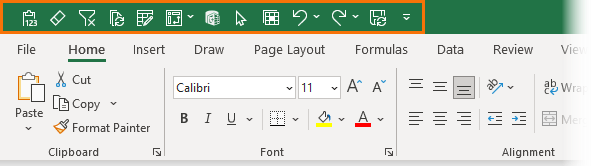
The QAT sits either above or below the ribbon. I prefer to place it above the ribbon as this takes up less space because it sits in the green header bar:

Excel Quick Access Toolbar above ribbon

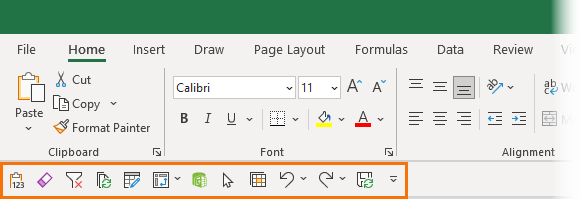
Whereas below the ribbon adds an extra row to my header area, although the upside is you get nice, coloured icons which are easier to see at a glance:

Excel Quick Access Toolbar below ribbon

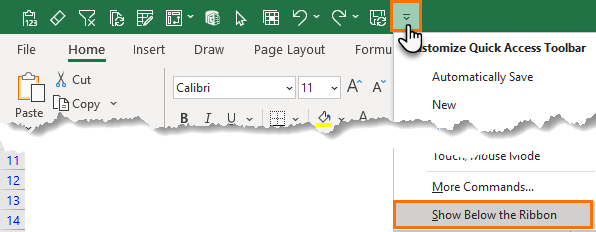
You can change the location of the QAT via the drop down:

Excel Quick Access Toolbar drop down menu

Watch the Video

Quick Access Toolbar Keyboard Shortcuts

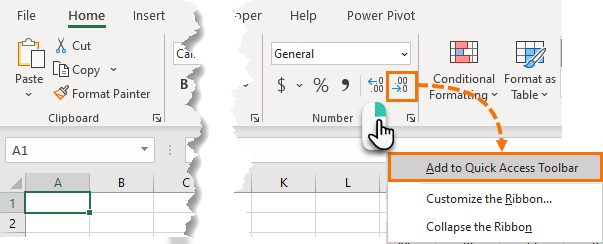
Adding an icon to the QAT is as easy as right-clicking on the icon > Add to Quick Access Toolbar:

add icons to Quick Access Toolbar

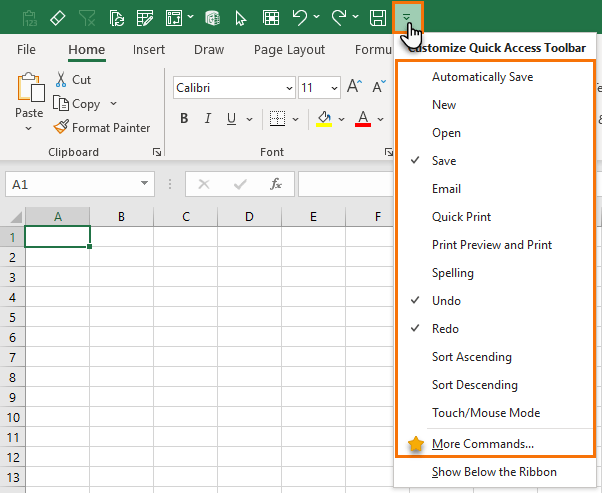
Alternatively, you can click on the drop down at the end of the QAT and choose from popular commands, or open the 'More Commands' dialog box as shown with the star in the list in the image below:

Quick Access Toolbar More Commands

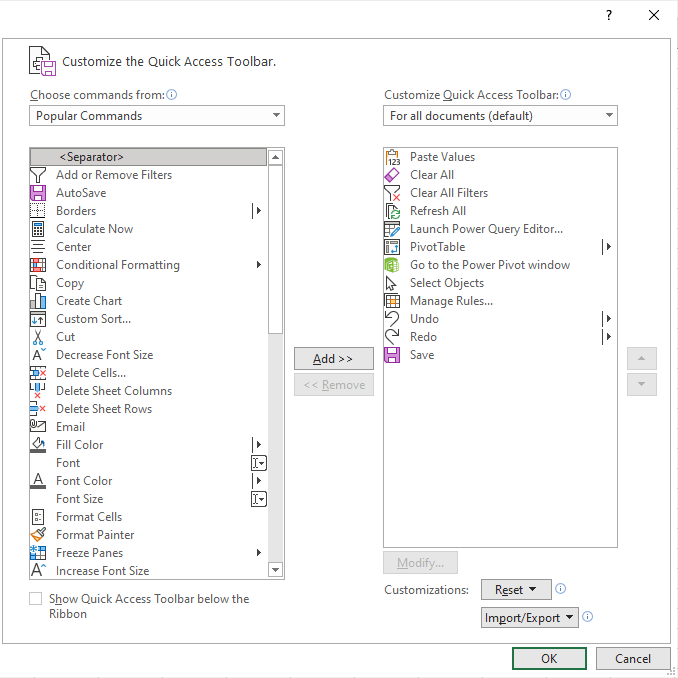
The More Commands dialog box allows you to search through all icons available and add them to the QAT:

Customize the Quick Access Toolbar

QAT Keyboard Shortcuts

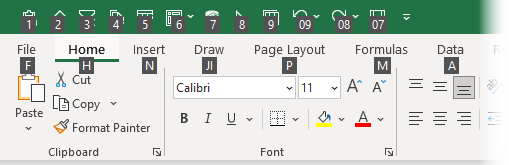
The first 9 positions in the QAT are the most prime real estate in Excel because with the click of two keys you have a very handy set of keyboard shortcuts. Pressing the ALT key and then a number from 1 to 9 is the equivalent of clicking the icons with your mouse. In the image below you can see the number for each icon which appears after pressing ALT:

Excel Quick Access Toolbar keyboard shortcuts

It's as simple as learning the number for each icon and you're off and running!

Note: you can also access the icons after position 9 by entering their number code e.g. the undo icon is number 09 so the shortcut is ALT > 0 > 9, it's just not quite as nice as entering a single number. And of course, in the case of Undo, it's easier to press CTRL+Z.

Which Icons to put in the Quick Access Toolbar

There's no perfect list of icons to include in the Quick Access Toolbar, but for such a prime piece of Excel real estate it's important to consider what gets a spot based on some strict criteria.

For me that criteria are as follows:

  1. There must not already be a super easy keyboard shortcut. e.g. don't put copy, paste or undo up there. Everyone knows CTRL+C, CTRL+V and CTRL+Z are the keyboard shortcuts for these most commonly used commands.
 
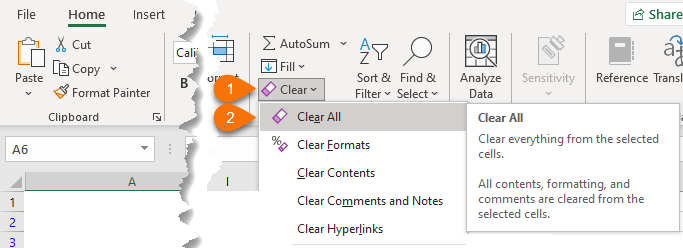
  1. It should save me multiple clicks. Most of the time the Home tab of the ribbon is visible, so putting commands in the QAT that are available here with a single click is probably a waste. One of the icons in my QAT is the Clear All button which requires a click on the drop down menu to expose it and then a second click on the icon, and there's no easy keyboard shortcut already available:

    Clear All icon

 
  1. And of course, it should be something I use regularly. Just because I have an icon in my QAT doesn't mean you should. If you don't use Power Pivot, then don't waste a spot in your QAT with the Power Pivot icon. And remember to update it regularly. Work habits change, so be sure to update your QAT in line with your current needs.
 

Mynda's QAT

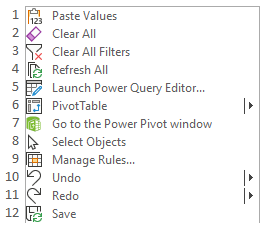
In case you're wondering what's in my QAT, below is a list of the icons:

Mynda's Quick Access Toolbar

You might be wondering why I have some icons I expressly said not to include, so I'll explain:

  1. Paste Values – although there's a couple of keyboard shortcuts for this, none are as short as ALT > 1
  2. Clear All requires two clicks to get to the button and it's something I use regularly to clear PivotTables, which the DELETE key simply can't handle.
  3. Clear All Filters is super handy when working with Excel Tables, which I do a lot.
  4. Refresh All is great for refreshing all queries and PivotTables in a workbook. There's a keyboard shortcut, CTRL+ALT+F5 but I find it cumbersome.
  5. Launch Power Query Editor – there's no practical keyboard shortcut for getting to this and it's at least a two click task depending on the route you take.
  6. Insert PivotTable – at least a couple of clicks or a cumbersome keyboard shortcut ALT > N > V > T
  7. Open Power Pivot Window – at least a couple of clicks unless you're lucky enough to be on the correct tab of the ribbon when you need it.
  8. Select Objects – I use this all the time and it bugs me having to click so many times to get to it.
  9. Manage Conditional Formatting Rules – at least two clicks and the option is at the bottom of a long list, which bugs me!
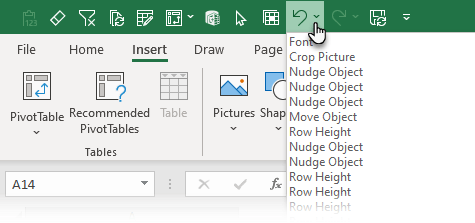
  10. Undo – this is outside the top 9 so it's not taking up a prime position. I keep it in the QAT so that I can see the undo stack from the drop down:

    Undo Icon

  11. Redo – same as for Redo
  12. Save – I have autosave always turned on these days, but sometimes I like the satisfaction of clicking the button and knowing that the file is actually saving. Call me old fashioned!
 

Have a great day!

Mynda Treacy

Co-Founder | My Online Training Hub


Learn with us!
 
Graduation cap with solid fill  Excel Dashboards  
Graduation cap with solid fill  Power BI  
Graduation cap with solid fill  Power Query  
Graduation cap with solid fill  Power Pivot & DAX  
Graduation cap with solid fill  Advanced Excel  
Graduation cap with solid fill  Advanced Formulas  
Graduation cap with solid fill  PivotTable Quick Start  
Graduation cap with solid fill  Xtreme PivotTables  
Graduation cap with solid fill  Excel Tables  
Graduation cap with solid fill  Financial Modelling in Excel  
Graduation cap with solid fill  Excel for Customer Service  
Graduation cap with solid fill  Excel, Word & Outlook  


The new Excel PivotTable add-in that will streamline working with PivotTables.

Check it out here.


If you frequently use Paste Special then you'll love PasteBuddy.

PasteBuddy allows you to configure your own shortcut keys for any command in the Paste Special menu.

Find out more about PasteBuddy here.


Tab Hound makes managing and navigating Excel workbooks with loads of tabs a piece of cake.

Find out more about Tab Hound here.


Copyright © 2021 My Online Training Hub, All rights reserved.
You are receiving this email because you either purchased one of our products, signed up for our free training or opted in to receive our newsletter.

Our mailing address is:
My Online Training Hub
PO Box 7206
Sippy Downs, Queensland 4556
Australia

Add us to your address book


unsubscribe from this list